Showing posts with label Cooler Master. Show all posts

Thursday, August 30, 2012

Keyboards & Mice II : Cooler Master

Hello everyone. I have updated the site a bit and included two new features. The ability to follow the blog by email and a quick list of popular posts in the last month. If you like what you have read so far and if you would prefer, kindly follow me by email.

Today I will be talking about Cooler Master(www.coolermaster.com) gaming peripherals. Cooler Master are more famous for their cases but they also have a few peripherals to offer.

Keyboards:

Mechanical Keyboards:

All of CM keyboards are mechanical so I thought it would be good to introduce people to mechanical keyboards. Mechanical keyboards use an actual physical switch underneath each key as opposed to common plastic membrane (with rubber domes) keyboards you find everywhere. The rubber domed ones are cheaper to manufacture and resist spills better but a mechanical keyboard will give you better tactile feedback when you press a key. Good mechanical keyboards also offer you N-Key Rollover which is basically a fancy way of saying that it can detect each keypress interdependently. Almost all switches used in mechanical keyboards come from a company called ZF Electronics (used to be known as Cherry Corporation.) They keys are color-coded with each having a slightly different feel and usage.

Cherry MX Blue: When you press this key, you will feel a bump and hear a click. The switch is actuated when you press the key halfway and with practice it can let you type faster using less effort since you do not have to press the key all the way down to register a keystroke. Great for typing but rather loud.

Cherry MX Brown: The tactile bump of the MX Blue minus the sound (unless you press the key all the way down, then it's loud.) Due to the switch design, you need slightly less force for actuation.

Cherry MX Black: No tactile or audio feedback, plus you need to press the key all the way down to actuate. Also require more force to actuate than the other keys. Great to prevent accidental keystrokes and marketed for high-end PC gaming. Less crisp and responsive than with the blue or brown switches for prolonged typing.

Cherry MX Red: A special variation on the MX Black. They have a low compression point and requires lower force to actuate. May increase typing errors.

CM Storm QuickFire Pro:


Interface: USB 2.0
You can buy this with either Cherry MX Black, Blue , Brown or a special Cherry MX Red Edition. Claims N key Rollover over USB Interface. Partial red colored back-lighting and the option to disable that pesky windows key. Also has multimedia shortcuts and a removable 1.8m braided USB cable with cable routing. Selling around the US$ 99.99 mark.


CM Storm QuickFire Rapid:


Interface: USB or PS/2
I prefer my keyboards on PS/2 so it is great that this board offers that. Plus it offers NKRO in PS/2 mode, Windows key disabling in game mode, multimedia shortcuts rubber coated surface with a minimalist design. Also has extra key-caps bundled with a key puller. Available in Cherry MX Black, Blue, Brown and a special Cherry MX Red Edition. Removable braided USB cable with cable routing. Hovering around US$ 79.99.


CM Storm Trigger:


Interface: USB
Comes in high durability gold-plated Cherry MX Black, Blue, Brown or Red switches. It also has five macro keys with profile management and 64kb on-board memory to store profiles. The ability to deactivate the windows keys, two USB 2.0 ports, detachable wrist rest, braided cable and non-slip rubber coating, the storm trigger is the ultimate offering from Cooler Master. Selling around the US$ 109.99 mark.


Mice:

CM Storm Xornet:


A budget friendly minimalist, lightweight mouse. Equipped with a precision anti-drift control 2000 DPI sensor. Features a rubberized anti-slip design. Has a very extended lifespan thanks to the Omron Micro Switches which are rated at 5 million + clicks. DPI on the fly! (500, 1000 and 2000)

Type: Wired
Interface: USB
Tracking Method: Optical
Buttons: 7
Maximum DPI: 2000
Price: US$ 29.99


CM Storm Spawn:


Xornet's bigger brother complete with 32kb on board memory to store button assignments, macros and other customization. Meant more for FPS gaming and those who prefer a claw grip. DPI settings can be changed via the buttons below the scroll wheel between 800, 1800 and 3500.

Type: Wired
Interface: USB
Tracking Method: Optical
Buttons: 7
Maximum DPI: 3500
Price: US$ 39.99


CM Storm Inferno:


A 4000 DPI twin laser sensor mouse meant for MMO gaming. Comes with 128kb on board memory that can store up to 3 different game profiles.

Type: Wired
Interface: USB
Tracking Method: Laser
Buttons: 11
Maximum DPI: 4000
Price: US$ 44.99


CM Storm Sentiner Advance II:


Capable of tracking from 200 - 8200 DPI (200 increments,) 128KB on board memory, 5 profiles with 4 DPI settings each. CM's ultimate mouse offering. Complete with lighting effects!

Type: Wired
Interface: USB
Tracking Method: Laser
Buttons: 9
Maximum DPI: 8200
Price: US$ 59.99


That is what Cooler Master is offering as of this moment. They are not a famous brand when it comes to peripherals but they have a good budget friendly collection that you can choose from. Seeing as how the most expensive mouse they have is around the 60 dollar mark, you could give them a chance if you so choose.
Personally I would pick the QuickFire Rapid keyboard with the Storm Inferno mouse. Both I feel are really good buys. Spawn is a very good mouse as well that you could choose if you prefer a claw grip.

As it is 3 in the morning, I shall now head off to sleep. See ya around guys!

Kiyoshi Out!
Psst... Hey... Spread the word! +1, Subscribe,Tweet ^_^ Thank you for reading.

Wednesday, July 25, 2012

KarachiDevil's Ultimate Build

Hi everyone!

As you may or may not know, the Islamic month of Ramadan has started and it is leaving me with precious little time for my blog. I am making every effort to post regularly during this month so thank you for your patience.

Today I will be talking about my dream build. What I could build if I had all the money in the world. So without further ado, let's get on with it.

CASE:


COOLERMASTER Cosmos II (www.coolermaster.com)

Motherboards : Micro ATX, ATX, E-ATX, XL-ATX
5.25" Drive Bays : 3
3.5" Drive Bays : 13 (Two from X-dock, 11 2.5"                        converted from the 3.5" bays)
Expansion Slots : 11
Dimensions : 13.5" x 27.7" x 26.1"
Price : US$ 349.99

This amazing case can take everything you throw at it and is great for both air cooling (10 fans!) & liquid cooling. A must have.


CPU:

Intel Core i7-3960X (www.intel.com)


Core Clock : 3.3 GHz
Turbo : 3.9 GHZ
6-Core, 12-Thread
L3 Cache : 15MB
L2 Cache : 6 x 256KB
Price : US$ 1029.99

When you dream, dream big, and it doesn't get any bigger then this outrageous extreme edition cpu from Intel.


MOTHERBOARD:


ASUS Rampage IV Extreme (www.asus.com)

Max Memory : 64GB
PCI-E 3.0 x16 : 5, 1 PCI-E x1
SATA Connectors : 4 SATA II, 6 SATA III
Dimensions : 12" x 10.7"
Price : US$ 429.99

When choosing the baddest CPU around, you would be remiss if you did not get the baddest motherboard around as well. Too many things to list here so check it out at the asus website.


VIDEO CARD:


EVGA GeForce GTX 690 Signature (www.evga.com)

Interface : PCI-E 3.0 x16
Core Clock : 915 MHz
Boost Clock : 1019 MHz
CUDA Cores : 3072
Memory : 4GB 512-bit GDDR5
Ports : 1x Mini DisplayPort 3 x DVI
Power Connection : 2 x 8-Pin
Dimensions : 11" x 4.38"
Price : US$ 1049.99

The 690 is actually a dual GPU card. The fastest card ever built. EVGA also has a liquid cooled version which will require a connection to a custom liquid cooling system. The ultimate GPU for the ultimate build.


SOUND CARD:


CREATIVE Sound Blaster Recon3D Fatal1ty Professional (www.soundblaster.com/)


Priced at US$ 149.99, in my opinion the best gaming sound card you can get. Crystal clear sound which will help you detect other players before they even know you are there. Go for it!


RAM:


CORSAIR Vengeance (www.corsair.com)


Capacity : 4 x 4GB + 4 x 4GB (32GB)
Speed : 1866
Voltage : 1.5V
Timing : 9-10-9-27
CAS Latency : 9
Price : US$ 119.99 + 119.99

Why two different? Well one is Red and one is Black and if I am making a dream build, The motherboard also has red and black slots for the RAM so..... ^_^ Dream Big!

POWER SUPPLY:


CORSAIR Professional Series GOLD AX850 (www.corsair.com)

Max Power : 850W
Active PFC
PCI-E Connectors : 4 x 6+2-Pin
SATA Connectors : 12
Fully Modular
80+ Gold Certified
Price : US$ 189.99

While I am building my ultimate build, I am still loathe to put in a bigger PSU than needed. I don't know why but I always cringe at putting in a big PSU.


LIQUID COOLING:


CORSAIR H100 Extreme (www.corsair.com/)

Featuring a full 240mm radiator and two 120mm fans, this beast will cool that crazy 6-core and keep quite nice and happy. I would do a custom liquid cooling but there would be too many parts to list. So for now this will have to do.
Price : US$ 109.99


HARD DRIVES:


CORSAIR Force Series GS SSD (www.corsair.com/)

Capacity : 180GB
Interface : SATA III
Max Seq. Read : 555MB/s
Max Seq. Write : 525MB/s
Price : US$ 164.99

Corsairs newest line of SSDs, the GS Series boasts very fast performance and more stability then previous iterations.


Western Digital Caviar Black (www.wdc.com)

Capacity : 1.0TB
Interface : SATA III
RPM : 7200
Cache : 64MB
Price : US$ 109.99

A very fast, very stable hard drive choice, the caviar black series is my personal favorite when it comes to hard drives.


OPTICAL DRIVE:


ASUS BW-12B1ST (www.asus.com)

BD-R Write Speed : 12X
BD-R DL : 4X
DVD+R/-R WS : 16X
Price : US$ 89.99

One of the best Blu-Ray Burners out there, the Asus option is fast, quiet and super stable.


TOTAL:


US$ 3914.88

FINAL THOUGHTS:


Could this be even more extreme? Certainly, but this was a sample ultimate build and as you can see the cost is already close to four grand. However if you want to make a affordable LGA 2011 build, you can and I will show an example build for that as well

CASE: NZXT Phantom Full Tower                                                                       US$ 119.99
CPU: Intel Core i7-3820 Quad-Core                                                                    US$ 299.99
MB: ASRock X79 Extreme4 LGA 2011                                                               US$ 224.99
GPU: SAPPHIRE Radeon HD 7970 OC                                                              US$ 459.00
RAM: CORSAIR XMS3 4 x 4GB DDR3 1333                                                    US$ 89.99
PSU: CORSAIR TX750 750W 80+ Bronze                                                         US$ 109.99
CPU Cooler: Cooler Master Hyper 212 Evo                                                         US$ 30.99
SSD: SAMSUNG 830 Series 64GB                                                                     US$ 89.99
HDD: TOSHIBA 500GB 7200 RPM 32MB Cache SATA 6.0Gb/s                      US$ 69.99

TOTAL:                                                                                                                US$ 1494.92

The options are endless and you can keep making it cheaper and cheaper.

I will also be posting the blog name suggestions as well for polling. Please be on the lookout for that.

Until then,
Kiyoshi Out!
Psst... Hey... Spread the word! +1, Subscribe,Tweet ^_^ Thank you for reading. 

Tuesday, May 29, 2012

KarachiDevil's Core-i5 Build

Hi Folks!

So today was my day off and after I slept for the majority of the morning, I am now awake and refreshed and wanted to post a build that I thought would be good for any games that are out right now and you should be able to play them at max settings. I will also list the prices for everything and the totals. I will be posting more builds in the near future as well as some other exciting posts that you should stay tuned for!

Today's build will be a Intel-Nvidia build. This should ensure some serious performance and room for a lot of overclocking.

CASE:


NZXT Phantom 410


The Mid-Tower brother of the Phantom, it has an adjustable interior pivot fan slot for directional air flow.

Dimensions : 20.94in x 8.46in x 20.31in.
Price : US$ 99.99


CPU:


Intel Core i5-3570K


The replacement for the phenomenal i5-2500K, it draws less power than it's predecessor and has a little bit more headroom for performance.

Stock Clock : 3.4 Ghz
Price : US$ 239.99


MOTHERBOARD:


ASRock Z77 Extreme6


Features 2 PCI-E 3.0 x16 slots and 4 SATA III Connectors, the Extreme 6 is a very good Z77 board.

Dimensions : 12.0in x 9.6in
Price : US$ 174.99


VIDEO CARD:


EVGA GeForce GTX 560-Ti 448 Ultra Classified


The 448 Cores version of a very good card, EVGAs version is going be a very good and a very stable card to buy.

Dimensions : 10.5in x 4.68in
Core Clock : 810Mhz
Memory : 320-bit 1280MB GDDR5
3-Way SLI Capable
Price : US$ 299.99


SOUND CARD:


CREATIVE Sound Blaster Recon3D


One of my favorite gaming centered sound card, the Recon 3D has a Quad-Core Audio Processor for gaming audio and crystal-clear voice communications. It is engineered for low-power consumption.

Connector: PCI-E x1 Slot
Price : US$ 99.99


RAM:


G.SKILL Sniper Series


One of my favorite RAM. It is Intel XMP Ready.

Speed : DDR3 1866
Capacity 8GB (2 x 4GB)
Timing : 9-10-9-28
Voltage : 1.5V
Price : US$ 59.99


POWER SUPPLY:


CORSAIR TX750M


The Modular Version of my PSU, It is a great Power Supply with very quiet operation and long life. Modular helps keeps air flow open and uninterrupted.

PCI-E Connector : 4 x 6+2-Pin
SATA Connector : 8
Dimensions : 5.9in x 3.4in x 6.3in
Price : US$ 119.99


CPU COOLER:


AIR COOLING:


COOLER MASTER Hyper 212 EVO


The next iteration of the incredibly popular and efficient Hyper 212, The EVO has four direct contact heat pipes.

Dimensions : 120mm fan, Heatsink 120mm x 80mm x 159mm
Price : $33.99


LIQUID COOLING:


CORSAIR H80 Liquid CPU Cooler


The newer i5 gives an incredible amount of heat and as such, a liquid cooler might be better for your build if you want do extreme overclocking or want your cpu to operate at very low temperatures. It includes a double-thick radiator and two 120mm fans.

Radiator Dimensions : 230mm x 152mm x 38mm
Price : US$ 104.99


HARD DRIVE:


Western Digital 1TB


THE WDC Black Edition is designed for high performance and such would be a perfect fit for your gaming computer.

Speed :  7200RPM
Interface : SATA III (6.0Gb/s)
Cache : 64MB
Price: US$ 119.99


MONITOR:


ACER G235H Abd


A Great monitor to go with your build, it is a perfect fit with your 560Ti 448.

Max Resolution : 1920 x 1080
Response Time : 5ms
Features VESA Wall Mounting : 100mm x 100mm
Price : US$ 139.99


TOTALS:


Total with Air Cooling : US$ 1148.92 (No Monitor)
Total with Liquid Cooling : US$ 1219.92 (No Monitor)

That is one of the builds in my mind that would give you stellar performance all across the board. Of course when making your build, you can substitute parts as you desire, however this will give you a good reference to base your build upon.

That is all for now folks, as always please +1, subscribe, spread the word if you like what you read and any comments are always welcome.

Kiyoshi out.

Saturday, May 19, 2012

Computer Cases

Edit: This post originally started last night but I could not finish it as I had to go to work at 4 again today so I slept early.

Hi folks!

Today was a very hectic day for me and after coming home I slept like a log and woke up not too long ago. I wanted to post this before I go to eat food and sleep again. I work at 4 in the morning so I need to sleep soon as well.

So today we are going to be talking about computer cases. Buying a good computer case is essential to your build. Part of it is of course aesthetics as you can show off a really cool looking case but a major thought should be put in to how the parts you have will fit inside your computer. You need to think of about effective cable routing, component size and air flow. Always look at the number of fans it can fit. It should have enough slots for your hard drives, also be spacious enough to house your huge video cards (as most of the time you have to take out a hard drive cage to accommodate them thereby reducing your carrying capacity for hard drives. As always dimensions, dimensions, dimensions! Pay close attention to your video card size, motherboard size, cpu cooler size and make sure they will all fit in to your case. You can either pick your case first and then fit components, or pick your components first and then go for the case. Either way be careful and plan ahead to save headaches later on.

The Companies that I like are Corsair, NZXT, Cooler Master, Antec and Thermaltake but make no mistake, there are a lot of companies and you are more then welcome to try out something else which catches your eye. Just make sure to look at what the case is constructed out of. Metals will last you longer then Plastics and tool less options will save you from pain.

Dimensions are H x W x L (Height x Width x Length)
ANTEC (http://www.antec.com)

Antec has a long list of Cases that you can look at on their website but I will be listing my favorite to keep it simple. Also take a look at their Skeleton Case. Very radical!

Antec Lanboy air

Supporting an awesome modular design, you can position almost all of your components any way you choose. With the ability of having up to 15 exhaust fans, this case will keep cool no matter what. Add to that the open frame mesh panel construction, heat and dust stay out!. Can fit up to a 16 inch graphics card. Selling for $179.99. Comes in Blue, Red and Yellow. It is a ATX Mid Tower and the Dimensions are 20.20 in x 8.70 in x 20.30 in


Other good cases from Antec,

Antec Gaming Series One
Price $49.99
Dimensions : 17.2in x 8.2in x 19.2in
Up to 10.5 inch Graphics Card can be fitted.

Antec Three Hundred
Price $54.99
Dimensions : 18.30in x 8.10in x 18.00in
Up to 11 inch Graphics Card can be fitted

COOLER MASTER (http://www.coolermaster.com)

Top of my list when it comes to computer cases and cooling solutions. Their COSMOS II was featured in the Dream Machine 2011 by Maximum PC.

Cooler Master HAF 922


The ever popular HAF Series (High Air Flow.) It supports 1 x 120mm rear fan, 1 x 200mm front red LED fan, 1 x 200mm top fan (or 2 x 120mm fans) and 1 x 200mm side fan (or 2 x 120mm fans) and a 120mm or 140mm bottom fan.. Can support E-ATX Motherboards. Selling for $149.99. ATX Mid Tower with Dimensions 22.20in x 10.00in x 19.70in.


Other good cases from Cooler Master,

Cooler Master HAF 932 Advanced
Price $149.99
Dimensions : 22.70in x 9.00in x 21.50in

Cooler Master HAF 912
Price $59.99
Dimensions : 19.50in x 9.10in x 18.90in
Can fit up to a 15.6 inch video after removing the hard drive cage, otherwise nearly ~10.6inch

NZXT (http://www.nzxt.com)

Makers of some really good looking cases, NZXT greatly held my interest as I was making my build. They also make gaming mice among other things.

NZXT Phantom


In my opinion one of the best looking cases out there, the Phantom is a ATX Full Tower capable of holding the most massive of video cards and very spacious on the inside with great cable management and air flow. Capable of holding up to 7 fans and also containing an integrated fan controller. It can support E-ATX motherboards. Selling for $124.99 and has several color options so browse Newegg for the other ones. Dimensions , 24.53in x 8.74in x 21.26in.


Other good cases from NZXT are,

KHAOS Classic Series
Price $249.99
Dimensions :  24in x 8.85in x 23.5in


M59
Price $49.99
Dimensions : 20in x 7.48in x 17.68in

CORSAIR (www.corsair.com)

Relatively new to the computer case scene, Corsair hit the ground running with some awesome cases.

Corsair Graphite Series 600T Special Edition White


 Looks gorgeous in white but is available in other colors as well, the 600T is a Mid Tower ATX case with a spacious inside. Supports Micro ATX and ATX motherboards. Selling for $169.99 and Dimensions are 23.30in x 10.4in x 20in


Corsair Carbide Series 500R White Steel
Price $139.99
Dimensions : 20.5in x 8.1in x 20in

Corsair Obsidian Series 800D
Price $259.99
Dimensions : 24in x 9in x 24in

THERMALTAKE (http://www.thermaltakeusa.com)

One of my favorite companies, Thermaltake has also entered the E-Sports scene with several very good gaming keyboards, mice and headsets (http://usa.ttesports.com/index.aspx) and if you are in touch with Star Craft 2, they sponsor White-Ra.

Thermaltake Level 10 GTS Snow Edition


This gorgeous case is ver good at keeping your components cool with support for up to 5 fans. Four hot-swappable hard drive bays are also available and capable of holding a decent sized video card. Selling for $114.99 and Dimensions are 18.2in x 9.2in x 20.1in.


Other good cases are as follows

Level 10
Price $799.99
Dimensions : 26.22in x 12.52in x 24.17in

Thermaltake Armor A90
Price $94.99
Dimensions : 20.30in x 8.30in x 19.80in

The case I chose was

HAF912


Found it for sale for $30. I will be upgrading in the future as well but for now loving this case and don't have any complains about it.

As always choose any case that you like but make sure meet your needs and have good airflow. I will try to post some more today but as it is the weekend, let's see.

Till then,
Kiyoshi out.

Thursday, May 17, 2012

CPU Cooler - Air Cooling

So I was bored and decided to continue writing.

This post will deal with the CPU Cooler. A good heatsink and fan combo is essential for cpu cooling (if you are going for air cooled system,) and you will be needing after market coolers as a lot of them perform better then stock coolers. So with that in mind here are some good ones you can look out for.

ARCTIC COOLING Freezer 7 Pro Rev.2

Featuring a Fluid Dynamic Cooler, the Freezer 7 is an amazing cooler for the money. Easy installation thanks to push pin mounting system, you can have it installed withing seconds (but please take a few minutes ^_^, be careful.) Extremely quite performance and wide compatibility with both AMD and Intel Socket types. Retailing for $29.99 at the moment.


COOLER MASTER Hyper 212 +


Featuring a 120mm long life sleeve fan, the 212 series has long been the favorite of system builders everywhere. Easy Installation and very good service life makes this a crowd favorite. Also helps that it is cheap! Wide compatibility with all current socket types. Sale Price, $29.99.


ZALMAN CNPS9700

featuring an LED 110mm 2 Ball Bearing Fan, the CNP is also another rock solid choice with very efficient cooling. It does cost more then the Hyper 212+ but its performance makes up for the price. Sells for $49.99.


COOLER MASTER V8

Featuring Eight Heatpipes, mirror finished base for maximum heat absorption and four sets of aluminum fins, The V8 will keep your CPU cooled and happy and it looks amazing in your system. Fan is of the Rifle bearing type. Sells for $54.99.


COOLER MASTER Hyper 212+ EVO


Yes lots of Cooler Master options but only because they are great! The Evo is compatible with the latest socket types and has the same great performance as the other 212+ fans. Selling for $34.99. Features a 120mm sleeve bearing type fan.


XIGMATEK Dark Knight II SD1283 Night Hawk Edition


Featuring Thermal Conductive Ceramic Coating and the ability to mount two fans for even more cooling, it has 3 x 8mm heat pipes for larger heat dissipation. Comes with one 120mm Long Life Bearing Fan. Sells for $49.99


You may have noticed different types of fan bearing and are probably wondering what it means. I will explain it now. You can think of bearings as the way the fan moves and depending on what technology is used, it has different effects.


Sleeve Bearing : The most common and inexpensive type, it uses two surfaces lubricated with oil or grease as a friction contact. Less durable at high temperatures and may have poor performance when mounted in any orientation other than vertical. May become noisy with age.

Rifle Bearing : Similar to Sleeve bearings, but are quieter and have as much lifespan as ball bearings. The bearing has a  spiral groove that pumps fluid from a reservoir. As a result can be mounted in a different alignment.

Ball Bearings : More expensive but do not suffer from orientation handicap and are far more durable at higher temperatures.

Fluid Bearings : Near silent operations and high life expectancy. Works on Fluid Dynamics (wiki link here for further explanation.) Generally the most expensive option.

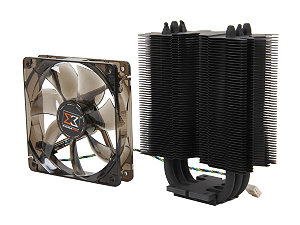
Be careful when installing and be sure not to over tighten screws as this may crack your motherboard and leave you in a pool of tears over your ruined build. Also be sure to take the size in to account as some are surprisingly big. Make sure the width of your Computer case can accommodate the length of the cooler. Also periodically open your case and clean any and all fans you have to increase their life and decrease operational temperatures as dirt and all can become a Insulator. I chose something I found for $10 and will be very shortly replacing it as it keeps my cpu more warm then I would like it to be. Nevertheless here it is

COOLER MASTER Hyper N520


The fan is smaller than I would like but it was not until I installed it and ran it that I thought I would need a bigger one. The best way to learn is through experience. I will probably get the Hyper 212+ EVO next with one more fan. Bought it on sale for $14.99 way back when. Actually it was my first purchase.

Kiyoshi Out!

Power Supply Unit (PSU)

Hi everyone!

Today is my day off from work so I woke up rather late. Hopefully today I will be able to post both about the PSU and the Computer Case.

Buying a PSU is something you may want to spend a little time thinking about. There are a couple of things you have to mindful about which I shall list here.

A) Always keep in mind how much power you actually need in the system. The obvious question that arises is how do you know? There are several tools on the internet which can help you calculate the power requirements of your build.
1. ASUSTeK
2. Thermaltake
3. Extreme Outervision

You can go to any of these links and start entering all the information it requires. Now here is a pro tip. After you see your recommended wattage, sit and think how much future upgrades you want to do. Now I, for example have one video card in my system at the moment but I intend on getting maybe more or maybe a newer more powerful one which may require more power. So let's say your recommended wattage come up as 450W. You can search for a 450W psu and you can get them pretty cheaply too, but if you do upgrades in the future, you will have to buy another psu because now suddenly your computer cannot provide enough power to all of your components. I would suggest going at least 100-150 Watts above your recommended wattage.

Of course you could go all out and buy a 1200 Watt PSU and not have to care about it all, but I would not recommend you do so. Firstly because you will not be using a huge portion of the power it can supply and basically will be under utilizing your psu. Secondly they cost more and if something goes wrong and your warranty does not cover it, you will just have lost quite a bit of money. I personally tend to look more for efficient usage and will try to buy things keeping that in mind. Of course if you want to by all means do it but I was just stating my personal opinion.

B) Noise. Noise is something you may not think off when building your pc but you will notice it when you are using your system regularly. It can become a bit annoying if you keep hearing a constant buzz in the background  . I would suggest reading a few reviews about the component and see if some people mention noise. I would also caution against over analyzing comments because the more you read, the more likely you are to run in to problems people ran in to because generally people resort to reviewing things only when something goes wrong. Take everything with a grain of salt.

C) Power Cables. What do I mean by power cables? When you buy PSUs, you will notice they come with a huge number of cables which you use to connect various things inside you computer. Make sure you have enough cables to power everything and also some extra cables left so you can expand in the future should you want to. Always make sure the PSU has cables for the video card because newer video cards all require their own direct connection to the PSU.

D) Clutter. Buy a PSU with a million cables and after you set up everything, you may notice that the inside looks cluttered with wires. Wire clutter can also impede air flow which in turn will raise the internal temperature and looks plain messy. I just love it when I open my case for cleaning and everything looks neat and organized. To solve that problem, manufactures also sell Modular Power Supplies which have the option of disconnecting power cables which you are not using thereby reducing clutter.

E) 80 PLUS Rating. What is 80+ ? 80+ is an initiative to promote and increase energy efficiency in PSUs. It certifies that products have at least 80% efficiency at 20%, 50% and 100% of rater load and a power factor of 0.9 or greater at 100% load. For you it will mean lower electricity bills,less waste of electric energy and less heat generation. There are several levels of this certification which are as follows


115V


230V

Loads
20%
50%
100%
20%
50%
100%
80 PLUS
80%
80%
80%
-
-
-
80+ Bronze
82%
85%
82%
81%
85%
81%
80+ Silver
85%
88%
85%
85%
89%
85%
80+ Gold
87%
90%
87%
88%
90%
88%
80+ Platinum
90%
92%
89%
90%
94%
91%
80+ Titanium


94%
96%
91%


Brands I love in this category are : Corsair, Antec, Cooler Master, OCZ and SeaSonic.

CORSAIR (www.corsair.com)

Corsair has several award winning PSUs and I greatly admire this company and the hard work it puts in to create quality products. They have 5 series of Power Supplies which you can choose from

1. CX Series


 Builder series for basic system builds. Carries 80+ Certification and comes in 430 Watts, 500 Watts and 600 Watts.


2. GS Series


Balanced between Price and Performance. Carries 80+ and 80+ Bronze Certifications and comes in 500W, 600W, 700W and 800W.


3. TX Series


Hardcore PC Gaming, Performance Enthusiast Level and affordable. Carries 80+ Bronze Certification throughout the series. Comes in 550W, 650W, 750W, 850W and 950W and has both Modular and Non Modular options.


4. HX Series


For Gaming Rigs and Overclocking Systems. Very stable and carries 80+ Bronze and 80+ Silver Certifications. Comes in 650W, 750W, 850W and 1050W. All Modular.


5. AX Series


Top of the line AX Series boasts top performance, reliability and energy efficiency. Carries 80+ Gold Certification throughout the range and comes in 650W, 750W, 850W and 1200W. Fully Modular.


ANTEC (http://www.antec.com/)

They make amazing Computer Cases and they also make amazing Power Supplies. They have a very big line of PSUs to choose from so I will be listing a few of them but you can go to their website and check them out. They also have a few 80+ Platinum PSUs in the mix. A small note. Read descriptions very carefully as they have a few power supply series that are exclusively compatible with Antec cases so they might not fit readily in your build.

1. VP Series


The entry level series from Antec with very good stability and a few of the models carry 80+ certifications as well. Good for budget builds. Comes in 350W, 430W, 450W, 500W and 550W.


2. Neo Eco


Economical, High Efficiency Power Supplies. The Neo Eco series has 80+ Certification throughout the series with Active Power Factor Correction (automatically switches to your voltage type, Universal Input) and quiet, solid operation. Available in 400W, 450W, 520W and 620W. Does not come with a power cable so you have to use your old one.


3. EarthWatts Series


Antec's environmentally friendly PSU series. 80+, 80+ Bronze and a few are 80+  Platinum Certified! Some of their PSUs are also SLI and CrossFireX Certified. Comes in 380W, 430W, 450W, 500W, 550W, 650W AND 750W. You can use them to power some good gaming rigs.


4. High Current Gamer


Antec's Gaming lineup features 80+ Bronze Certification throughout the line, special High Current connectors and heavy duty cabling all designed to give you high efficiency, excellent cooling and loads of power. Some also feature SLI and CrossFire certifications. Modular options also available. Comes in 400W, 520W, 620W, 750W and 900W.


5.  High Current Pro


Antec's top of the line series boasting 80+ Gold PSUs and one Platinum Certified PSU. Supporting Modular Cable Management, the HCP comes in 750W, 850W, 1000W and 1200W. A very solid choice to consider.


COOLER MASTER (www.coolermaster.com/)

Makers of some of the best Computer Cases, Cooler Master also makes some good Power Supplies. Chief amongst them is the Silent Pro Gold  Lineup


Featuring an 80+ Gold Rating, The Silen Pro Gold is a very good lineup of PSUs that you can consider from. Comes in 800W, 1000W and 1200W. Good noise reduction capability as well.


Make sure that your motherboard also supports the PSU by looking up the PSU Type. For example my Cosshair V mother board requires for a fully configured system to use a PSU that complies with ATX 12V Specification 2.0 (or later version.) Make sure it has a decent number of SATA power connectors (to connect your hard drives now or in the future,) and PCI-E Connectors (to power up your video card.) Check dimensions to make sure it will fit in your system. Generally PSUs are of a similar shape but just pay attention when you are buying so you can avoid having to send it back in because it could not fit in to whatever Case you ended up buying.

You can check out Newegg and browse through their huge collection to see which one you like but for my money, you can't go wrong with Corsair or Antec PSUs. In the end the PSU I chose was


Corsair TX750W PSU.
Type : ATX 12V v2.31/ EPS12V v2.92
Max Power : 750Watts
PFC (Power Factor Correction) : Active
PCI-E Connectors : 4 x 6+2 Pin
Sata Connectors : 8
80+ Bronze

My recommended power came up as ~430W. With that in mind and my future build ideas I selected 750W as my PSU power and I went for this PSU out of all the others chiefly for price. It is retailing right now  $104.99 but I bought it for $80 at a ridiculous sale I found one day.

My next post will be about the CPU fan and Case choices. As things are wrapping up for the Computer Build blog, I have quite a few ideas in mind for the next phase of my blog. I am confident that you will like the new direction it will be headed in. I will still discuss current components in the market and my thoughts on them but I will also be adding several new things in the mix and I hope you all keep reading to see them. Please subscribe if you like what you see so far and as always comments are welcome to help me get better at this as well as any kind of discussions you would like to have.

Kiyoshi out.